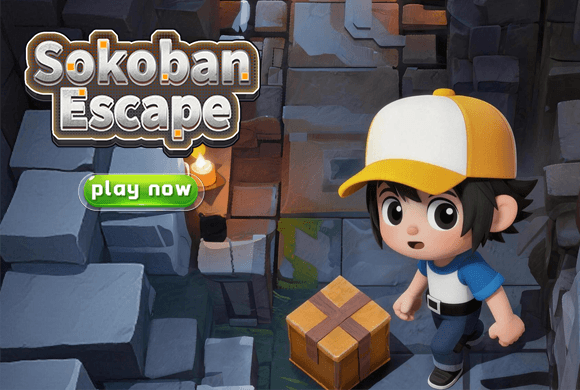
Sokoban Escape turns the classic box-pushing puzzle into a compact 3D dungeon. Move the boy around brick rooms, push crates from the correct side, and avoid trapping them against walls or in corners.
Early stages teach the rules gently, while later rooms tighten the corridors. Return, Reset, and Simplify tools give you ways to recover or get assistance as the layouts grow more demanding after about Level 20.
Standing space matters
A crate can only move when the character can reach the side behind it, so preserve access around every target and corridor.
01Study the room
02Move behind a crate
03Protect escape routes
3D crate pushing
Push crates without trapping them
Study the room. Locate every crate, target, wall, corridor, and door before making the first push.
Move behind a crate. Approach from the side opposite the intended direction and push it one space at a time.
Protect escape routes. Avoid corners and wall positions that prevent the character from getting behind the crate again.
Use the puzzle tools. Choose Return for a recent mistake, Reset for a fresh attempt, or Simplify when you need help.
Good to know
Classic pushes in 3D rooms
A dedicated title screen includes a Start Game button.
Early levels stay approachable, and the challenge grows after about Level 20.
Later rooms such as Level 11 tighten the corridors.
Return, Reset, and Simplify tools are available during play.
See the rooms
Inside Sokoban Escape
Start from the dedicated title screenPlan a route through Level 11Approach each crate from the correct sidePreserve room to maneuverSolve a more involved crate arrangement
Sokoban Escape guide
Plan the push before the dead end
The important move is usually the push, not the walk. Before touching a crate, decide where it must finish and whether you can still get behind it after every intermediate step.
Mark dangerous corners
Treat any non-target corner as a permanent trap and keep crates away from it.
Keep corridors open
Do not park a crate where it blocks the only route needed to circle around another box.
Undo early
Use Return as soon as a push breaks the plan instead of adding more moves to a lost position.
Questions
Sokoban Escape FAQ
What is the goal in Sokoban Escape?
Push the boxes to their required positions and clear the room or escape route.
Does the game have an undo option?
Yes. The interface includes Return, Reset, and Simplify tools.
How difficult is it?
The early levels are approachable. Later rooms such as Level 11 tighten the corridors, and the challenge grows after about Level 20.
Can I play Sokoban Escape in a browser?
Yes. Sokoban Escape loads in the portrait browser player on this page so you can push crates without a separate install.
Ready for another crate room?
Return to the brick corridor, plan the next push, and keep a path open behind every crate.