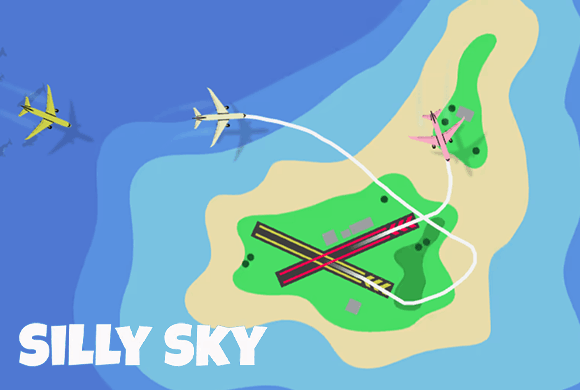
Silly Sky Plan safe flight paths and land every plane on its matching runway.
Select incoming aircraft, plan routes toward the corresponding colored runways, and keep every path separated so collisions do not reduce your successful landing total.
Plan flight routesSelect a plane and guide its approach
Color matchingLand aircraft on the corresponding runway
Three difficultiesChoose Easy, Medium, or Hard
Adaptive layoutSupports portrait and landscape play
Guide every aircraft onto the right runway without a collision
Silly Sky is an air-traffic logic game played above an island airport. Select an incoming plane and plan a route that brings it onto the runway matching its color.
Several aircraft can share the airspace, so each approach must account for the routes already in motion. Successful landings increase the counter at the bottom of the screen, shown as a plane count out of 10, while a collision reduces that total.
A safe landing starts before the runway
Leave enough distance between approaches and avoid drawing routes through another aircraft's current or expected flight path.
01Choose a difficulty
02Select an incoming plane
03Match the runway color
Air-traffic planning
Plan routes onto matching runways
Choose a difficulty. Select Easy, Medium, or Hard from the Island screen before starting the air-traffic challenge.
Select an incoming plane. Tap an aircraft to begin planning the route it should follow across the island airspace.
Match the runway color. Guide the plane toward the runway that corresponds to its color and align the final approach safely.
Keep routes separated. Watch every moving aircraft and revise the timing or shape of a route to prevent collisions that reduce landed-plane progress.
Good to know
Plan the airspace, then land
The Island selection screen offers Easy, Medium, and Hard difficulties.
The game supports both portrait and landscape screen layouts.
The landing objective is tracked at the bottom as a plane count out of 10.
A collision reduces the number of successfully landed aircraft already counted.
See the airspace
Inside Silly Sky
Choose Easy, Medium, or HardMonitor the island in landscapeGuide each plane to its runwayAvoid collisions and lost landings
Silly Sky guide
Separate approaches before they cross
Plan each flight as part of the entire airspace, not as an isolated route. Check the runway color, current traffic, and the space needed for the final approach before committing a plane.
Bring planes in from different sides
Approach matching runways from opposite edges when possible so paths do not converge over the island center.
Stagger arrivals
Delay or lengthen one route when two aircraft would reach the crossing runways at the same time.
Protect completed progress
As the landing count rises toward 10, favor wider and safer routes because one collision can remove aircraft from the successful total.
Questions
Silly Sky FAQ
How do you control planes in Silly Sky?
Select an incoming aircraft and plan a flight path that guides it toward the corresponding colored runway.
What happens when planes collide?
A collision reduces the number of successfully landed planes already counted toward the total of 10.
Can Silly Sky be played in portrait and landscape?
Yes. Silly Sky supports both portrait and landscape layouts.
What difficulty settings are available?
The Island selection screen provides Easy, Medium, and Hard options.
Can I play Silly Sky in a browser?
Yes. Silly Sky runs in the embedded browser player on this page and can switch between portrait and landscape as you rotate the device.
Ready to land another fleet?
Return to the island, separate the next approaches, and keep every plane on its matching runway.