Train Master Toggle the junctions, collect every passenger, and keep the engine clear.
Change the direction at rail junctions, guide trains through every passenger pickup, and plan around the growing carriages so the engine never crashes into the train.
Switch directionsChange the route at rail junctions
Passenger pickupCollect everyone placed beside the tracks
Growing trainMore passengers add more carriages
Train collectionEngine and carriage unlocks cost 45 to 125 coins
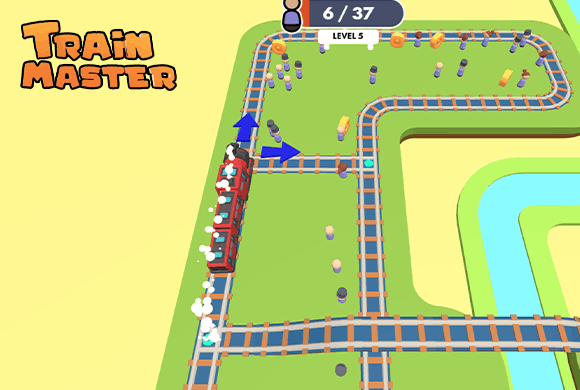
Train Master is a route-planning puzzle played on looping 3D tracks. Toggle the blue direction markers at junctions to send the engine toward waiting passengers and build a longer train.
Every new carriage makes the route harder to manage because the engine can collide with its own train. By Level 4 you handle multiple trains and 48 passengers, while the TRAINS panel offers alternate engines and carriages.
Length changes the puzzle
A route that was safe for a short train can become dangerous after several passenger pickups add more carriages.
01Read the rail loop
02Switch a junction
03Collect the passengers
Train route logic
Switch junctions before the train arrives
Read the rail loop. Locate each passenger group, junction, train, and possible collision point.
Switch a junction. Tap the direction marker before the engine reaches it to choose the next branch.
Collect the passengers. Guide the train past every waiting group and add carriages as the passenger total grows.
Avoid an accident. Keep the engine away from its own carriages and any other trains sharing the network.
Good to know
Switch early, grow the train
The game opens directly on a Level 1 rail tutorial.
By Level 4 you handle multiple trains and 48 passengers.
Later stages can place multiple trains on the network.
The TRAINS panel unlocks engines and carriages with coins or ads, priced from 45 to 125.
See the tracks
Inside Train Master
Learn to switch the Level 1 junctionManage multiple trains on Level 4Browse engines and carriagesRoute the train toward each pickupPlan around a growing trainSwitch busy junctions before arrival
Train Master guide
Watch the last carriage as well as the engine
Look beyond the next passenger group. Every pickup changes the train's footprint, so the junction sequence must leave enough space for the engine and all attached carriages.
Set junctions early
Decide the next branch before the engine reaches the switch so you are not reacting after the route is already committed.
Track the last carriage
Watch where the back of the train is leaving the junction before routing the engine across the same piece of track.
Handle one train at a time
When several trains share the map, establish a safe loop for one before changing the switches for another.
Questions
Train Master FAQ
How do I change a train's route?
Tap the blue direction control at a junction before the train arrives to select the outgoing branch.
Why does the train become harder to manage?
Passenger pickups add carriages, increasing the chance that the engine crosses into its own train.
What is in the TRAINS panel?
The TRAINS panel offers engine and carriage designs purchased with coins or unlocked through ads. Prices range from 45 to 125 coins.
How busy does Level 4 get?
By Level 4 you handle multiple trains on the same network and a 48-passenger pickup total.
Can I play Train Master without downloading an app?
Yes. Train Master runs in the embedded browser player on this page without a separate download.
Ready for another rail loop?
Return to the tracks, switch the next junction early, and leave room for every carriage.