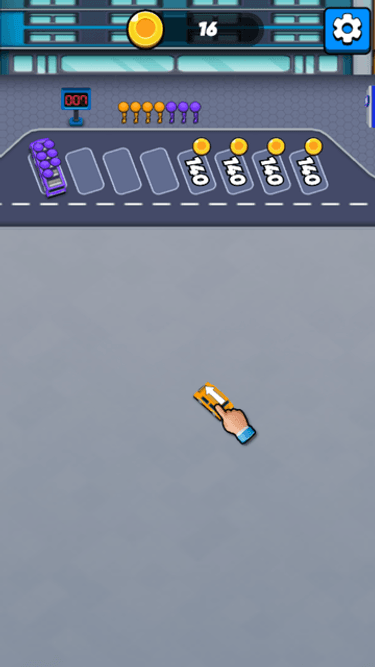
Bus Parking Out Clear the right bus route, then keep the passenger queue moving.
Read the packed lower lanes, choose a bus whose arrow has a clear route to the bays, and keep checking the matching passenger queue as buses park and depart.
Release orderClear the bus that blocks the next route
Passenger queuesMatch the people waiting above the bays
Arrow-marked busesTrace every bus lane before moving it
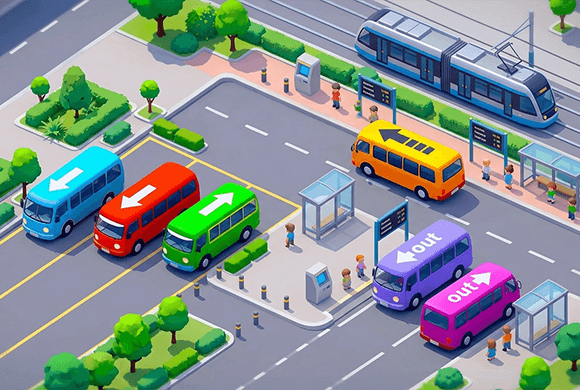
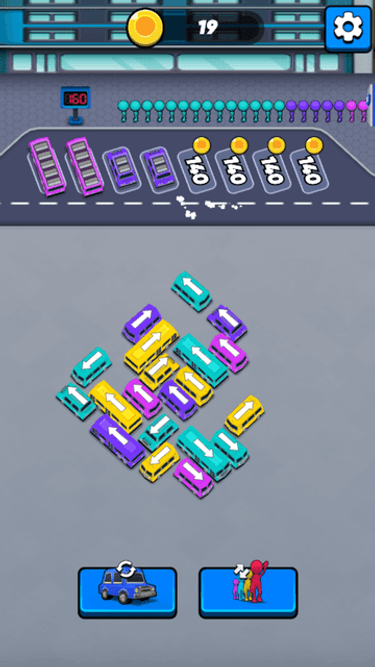
Bus Parking Out is a parking and passenger-flow puzzle. Each bus carries a visible direction arrow, and a move works only when the lane in front of that arrow is clear enough for the bus to reach the parking bays.
Once a bus reaches a bay, the passenger row above it matters too: matching-colour passengers board, and a filled bus leaves. The board changes after every move, so route, bay, and queue must be read together.
One move changes the next route
If one bus sits in another bus's arrow lane, move the blocker first when its own route is clear. Then rescan the newly opened space, the bays, and the passenger queue.
01Read one arrow
02Find the blocker
03Check the passenger match
Bus order puzzle
Move buses in a workable order
Read one bus route. Follow the bus's printed arrow toward the parking bays. Check whether another bus occupies that lane before you tap.
Name the blocker. If the move would collide, find the first bus in that lane and check whether it can move first instead of repeating the blocked tap.
Check the passenger row. For a clear route, compare the bus with the passenger colours waiting above the bays and leave room for boarding to continue.
Move, then rescan. A bus entering a bay, filling with passengers, or leaving changes the terminal. Start the route check again before the next move.
Read the terminal · 01
How to Read a Bus Exit
Start with one bus, not the whole terminal. Read its printed arrow, trace the lane toward the parking bays, then decide whether another bus occupies that route.
Read the arrow as a route
The arrow shows the direction the bus will travel. A free-looking patch beside the bus does not make it available; the route in front of that arrow must be clear.
Trace until the next bus or open space
Follow the bus from its nose along the arrow. If another bus sits in that lane, the move is BLOCKED. If the route reaches usable parking space without another bus in the way, it is a candidate to move.
Check the terminal, not only the bus
A clear route is the first check. Before you commit, also look at the open bays and the passengers waiting above them, because that move changes what can happen next.
READ ARROW
TRACE LANE
OPEN OR BLOCKED
Read the terminal · 02
What Is Blocking This Bus?
Do not stop at the word BLOCKED. Name the bus in the lane. That bus is the next part of the release chain to investigate.
Find the first vehicle in the lane
When a bus cannot advance, look directly along its arrow until you reach the bus occupying that space. The first occupied vehicle is the blocker that makes the current move fail.
Move the blocker before retesting
A collision sends the bus back to its starting area. Instead of repeating that tap, check whether the blocking bus has a clear route, then read the board again after it moves.
BUS A
BLOCKER B
MOVE B
RESCAN A
Read the terminal · 03
How One Bus Creates Space
A successful move does more than remove one bus from the lower area. It changes the lane the next bus can use and the parking capacity available above.
Read the space that opens
When a bus moves out of another bus's arrow lane, that lower route changes from occupied to clear. Treat the empty space as a new fact, not as proof that every remaining bus is now safe.
Test the newly uncovered bus again
The uncovered bus may now be a useful candidate, but its own arrow, destination bay, and passenger situation still need a fresh check. The board has changed, so the old decision no longer applies automatically.
BUS MOVES
SPACE OPENS
NEXT LANE CHANGES
RESCAN
Read the terminal · 04
How Passenger Queues Change the Decision
The coloured passengers above the bays are part of the puzzle state. A bus move is useful when it can join the passenger flow as well as clear a route.
Match the visible colours
Look at the passengers waiting above the bays and the colour of the bus you are considering. Blue passengers board a blue bus and red passengers board a red bus, so the queue changes which clear move is useful now.
A parked bus may still need to wait
Entering a bay is not the final result. A bus leaves after its seats are filled, so keep watching the queue and the spaces still available to the next bus.
Save a bay for a matching bus
Filling the parking bays without boarding passengers ends the run. Do not treat a full row of buses as progress unless the passenger flow can continue.
BUS + QUEUE
BOARD PASSENGERS
BUS LEAVES
BAY OPENS
Read the terminal · 05
Follow the Bus Release Chain
A release chain is a simple cause-and-effect read: move the bus that blocks another route, then check the bus that route was holding back.
Work from the open bus backward
If cyan A points into purple B, A cannot be the first move. Check B first. Once B has moved to a bay, A no longer faces that same vehicle in its lane.
Let each move set up the next check
The useful question is not which bus looks easiest in isolation. Ask which confirmed move removes a blocker or creates a bay that makes another real decision possible.
B MOVES
A IS UNCOVERED
QUEUE CHANGES
READ AGAIN
Read the terminal · 06
A Simple 5-Step Method for Bus Parking Out
Use the same short loop whenever the lower area becomes crowded. It keeps route, space, and passengers in one decision.
1. READ and 2. CHECK
Read one bus arrow, then trace its lane. Classify the route as clear or blocked, and name the bus that blocks it when it is not clear.
3. PRIORITIZE
Compare the confirmed routes with the open bays and the passenger colours waiting above. Choose a move that can keep the terminal working, not just one that looks close to an edge.
4. RELEASE and 5. RESCAN
Move the confirmed bus, then start the check again. A newly empty lane, a filled bus leaving, or a changed passenger row can make the next choice different.
READ
CHECK
PRIORITIZE
RELEASE
RESCAN
Look closer · 07
Bus Parking Out Release Examples
Which bus should move first?
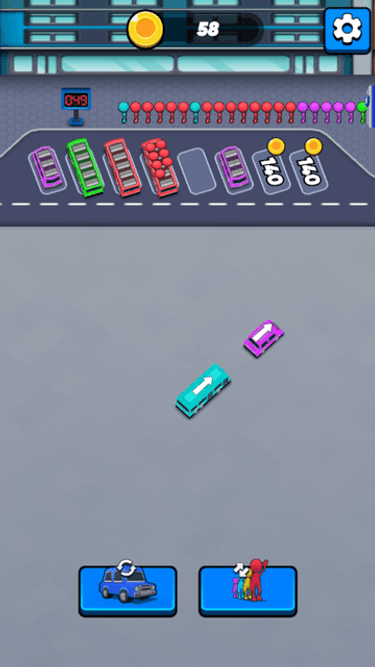
Cyan A points toward purple B in the same lower lane. B occupies the route A needs, so the next decision is whether B can move first.
Read ACyan A is behind purple B in the direction it needs to travel.
Try it: Before revealing the answer, can cyan A use the space in front of its arrow, or is purple B occupying its route?
Read cyan A's arrow rather than the empty floor beside it. Purple B sits ahead in the lane A needs.
The blocked attempt confirms the route: A reaches B and returns, so tapping A again would not create space.
Move B first when its own route is ready. After B changes position, rescan A's arrow, the available bays, and the passenger row before choosing the next tap.
Release chain · remove the real blocker first
READ A
FIND B
MOVE B
RESCAN A
BLOCKER A bus behind another bus in its arrow lane must wait. Find out whether the front bus can move before you test the blocked one again.
A useful move connects to the passenger queue
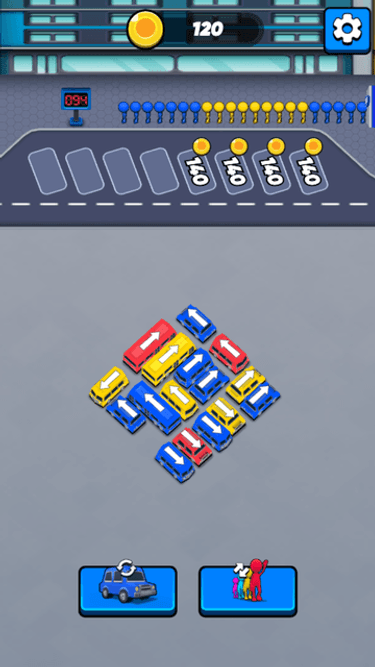
Blue and red buses can reach the bays while matching-colour passengers wait above. The queue is part of the decision, not decoration around it.
Blue busBlue bus · compare the selected bus with the waiting passenger colours.
Try it: Once a bus has a clear route to a bay, what should you check before deciding that the move will help the terminal?
A clear lane lets a bus reach a bay, but it is only the first part of the decision.
Compare the bus colour with the people waiting above. Blue passengers board blue and red passengers board red.
When the red bus fills, it departs and changes the bay layout. Rescan the queue and open spaces before moving another lower bus.
Passenger flow · a bus move has a second consequence
CHECK BUS
READ QUEUE
PASSENGERS BOARD
BAY CHANGES
QUEUE + ROUTE Choose a clear bus move with the passenger row in view. The route tells you whether it can move; the queue tells you what the move can set up.
Entering a bay is not the finish
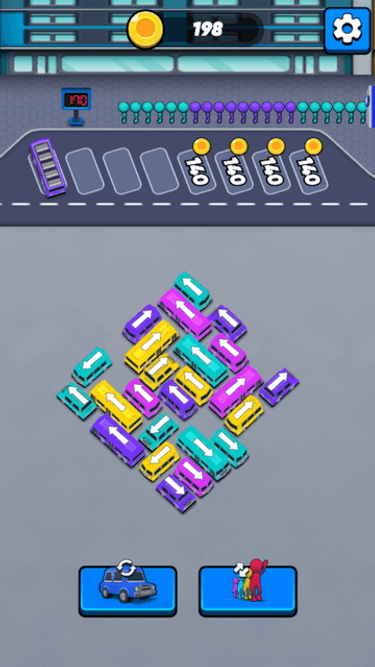
The purple bus can wait at a bay before it departs, so a parked bus is not automatically cleared.
WaitingWaiting · the bus has reached the bay but has not left.
Try it: Does a bus leave as soon as it reaches a bay, or should you keep reading the passenger flow?
The purple bus is already parked, so reaching a bay does not by itself clear it from the terminal.
Keep checking the passengers above the bays and the seats in the bus. The bus leaves only after the boarding flow has completed.
Its departure opens a bay for the next decision. Return to the lower buses and rescan their routes rather than assuming the previous order still applies.
Boarding cycle · the bay becomes useful again
PARK
BOARD
BUS LEAVES
OPEN A BAY
WAIT FOR FLOW Do not judge the board only by where buses are parked. A bay becomes available for the next bus when its current passengers have completed the cycle.
Why a full terminal can fail
The parking bays are full while no passenger can board. Occupying every bay is not the same as keeping the system moving.
FailureThe level ends when the terminal fills without a working passenger flow.
Try it: What is missing when every bay is occupied but the passenger flow cannot start?
The bays are occupied, but no boarding sequence is progressing.
That state fails the level, so do not use the last workable bay without checking whether the waiting passengers can use the buses already parked.
On the next attempt, read the bus routes and queue colours together before adding another bus to the terminal.
Failure feedback · capacity without flow is not progress
BAYS FILL
NO BOARDING
FLOW STOPS
TRY A NEW ORDER
SAVE A MATCHING BAY Parking capacity only helps when it can accept the next useful bus and let passengers board. Preserve that flow as you plan the release order.
Tools and terminal flow
Change the colours, then read again
The left-hand rearrangement control changes bus colours while their visible arrows remain in place.
The right-hand passenger-colour control changes the current passenger colour to create a matching boarding situation.
Neither control clears a blocked bus lane, so trace the relevant arrow again after using one.
The portrait game board keeps the lower bus routes, upper bays, passenger row, and both controls in one view.
Rearrange bus colours without changing their arrows
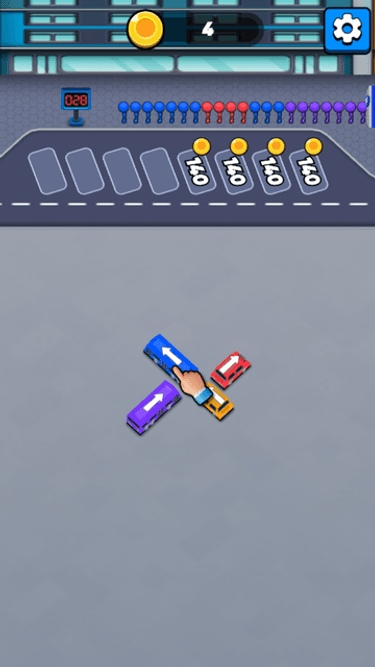
The left-hand rearrangement control changes the colours on the crowded bus group while the printed arrow directions stay in place.
Crowded boardThe group is crowded and the passenger row has blue and yellow people waiting.
Try it: After the bus colours change, which puzzle detail should you read again before choosing a bus?
Use the rearrangement only after you know what colour match or release chain you need to improve.
The buses keep their visible arrows, so the route-reading rule does not disappear when their colours change.
After the colours change, rescan the passenger row, open bays, and every bus lane before choosing the next move.
REARRANGE A colour change can alter the passenger decision, but it does not make a blocked arrow lane safe. Read both parts again.
Change the passenger colour when the queue does not match
The right-hand passenger-colour control changes waiting passengers to match the bus at the bay.
MismatchThe bus and current passengers are not the same colour.
Try it: When the bus and the waiting passengers do not match, what can this control change before you try to fill the bay?
First confirm that the current passenger colours do not match the bus you need to fill.
Select the passenger-colour control to change that queue; it changes the passenger decision, not a blocked bus route.
After the colours match, check whether the relevant bus can board and whether the rest of the terminal still has a workable release order.
Passenger colour · restore a usable boarding match
NOTICE MISMATCH
SELECT TOOL
COLOURS MATCH
CHECK FLOW
PASSENGER COLOUR Use the passenger-colour control when a visible mismatch prevents boarding. Then return to the full route-and-queue check.
See the terminal
Inside the Bus Parking Out jam
Read which bus occupies the other bus's routeA blocked route sends the bus backCheck the bus route and matching queueA clear move needs a working passenger flowA filled bus leaves and opens capacityUse a tool only after reading the next route
Bus Parking Out guide
Keep the buses, bays, and queues moving
A move is useful when it clears a real route and leaves the terminal able to board passengers. Check the bus in front of the arrow before you commit, then read the changed board again.
Find the actual blocker
When a bus returns, trace the arrow to the vehicle it reached. That bus, not the empty floor beside it, is the reason the move failed. Check whether the blocker can move before retesting the first bus.
Read queues with the bays
A bus that can reach a bay still has to serve the passenger flow. Compare its colour with the people waiting above, and avoid filling the final workable bay when no boarding sequence can start.
Use the tools for a defined mismatch
The rearrangement control changes bus colours while arrows remain, and the passenger-colour control changes the queue. Use either only after identifying the bus, queue, or route it should improve, then rescan the terminal.
Questions
Bus Parking Out FAQ
What is the goal in Bus Parking Out?
Move arrow-marked buses through clear lanes to the parking bays, board matching passengers, and keep the terminal able to accept the next useful bus.
Do passenger queues matter?
Yes. The passenger colours above the bays determine which buses can board. A bus that reaches a bay is not fully resolved until that passenger flow completes.
What makes later levels harder?
Crowded bus groups make it harder to see which arrow lane is clear and which bus is blocking it. Read one route at a time, then rescan after each move changes the space.
Can I play Bus Parking Out in a browser?
Yes. Bus Parking Out runs in the embedded browser player on this page without a separate download.
Ready to clear the next terminal?
Return to the terminal, trace one clear bus route, and let that move open the next useful bay or lane.