Collect the parcels, then follow the delivery route
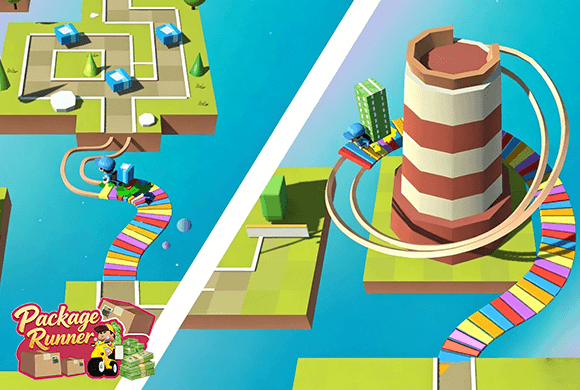
Package Runner is a 3D route puzzle controlled with up, down, left, and right swipes. Guide the courier across a floating maze, collect the available parcels, and continue over a rainbow bridge toward the town where delivery begins.
The home screen includes money, energy, Local and Global options, a daily gift, and a shop split between Rider and car tabs. Swipe controls are designed for touch; a phone or tablet is the most direct way to guide the courier.
Swipe input is central
Package Runner is designed around directional swipe gestures, making a touch screen the most direct way to control the courier.
01Read the platform maze
02Swipe in four directions
03Collect the packages
Swipe direction puzzle
Swipe the courier through the maze
Read the platform maze. Locate the courier, the packages, and the open lanes that connect to the rainbow bridge.
Swipe in four directions. Swipe up, down, left, or right to move the courier through the 3D route.
Collect the packages. Visit the parcel positions before leaving the platform so the delivery load is ready.
Reach the town. Cross the rainbow bridge and continue to the town where the collected packages are delivered.
Good to know
Swipe, collect, then deliver
The dedicated home screen shows money, five energy, level selection, and a daily gift.
Local and Global options are visible from the opening screen.
The shop has Rider and car tabs for courier looks and delivery vehicles.
Swipe controls are designed for touch; a phone or tablet is the most direct way to guide the courier.
See the route
Inside the Package Runner route
Choose Level 1 from the delivery hubCollect packages on the floating routeSwipe through the platform lanesCarry the parcels toward the bridgeBrowse courier looks in the Rider shopCompare delivery vehicles in the car shop
Package Runner guide
Collect parcels before the bridge
Plan the collection path before the first swipe. A route that reaches the bridge too early may leave a parcel behind, so connect the pickup positions into one efficient sequence.
Use touch input when possible
The game relies on directional swipes. A phone or tablet is the most direct way to guide the courier.
Connect pickups before the bridge
Trace a path through all visible packages first, then line up the final swipe that sends the courier toward the rainbow bridge.
Match shop upgrades to the route
The shop separates rider looks and delivery vehicles, letting progression expand both parts of the courier theme.
Questions
Package Runner FAQ
How do I move in Package Runner?
Swipe up, down, left, or right to guide the courier through the 3D platform route.
What happens after I collect the packages?
Follow the route over the rainbow bridge toward the town, where the courier delivers the collected parcels.
What is available in the shop?
The shop has separate Rider and car tabs with courier appearances, a bicycle, and delivery motorcycles.
Can I play Package Runner in a browser?
Yes. Package Runner runs in the embedded browser player on this page without a separate download.
Ready for another delivery?
Return to the floating maze, swipe through the parcels, and carry them across the bridge.