Find Master 3d · hidden objects · timed collection
Find Master 3d Spot three identical objects in a crowded 3D pile before the timer runs out.
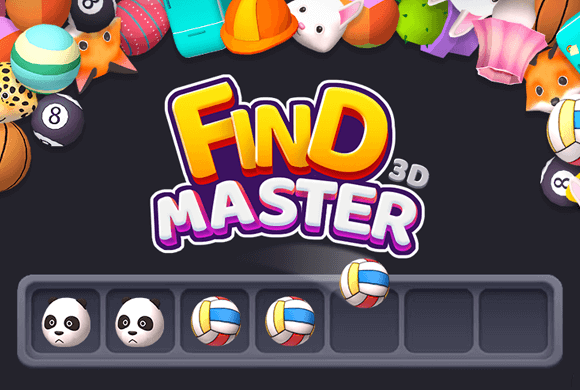
Search through overlapping 3D toys and food, tap matching trios into the collection tray, and complete the target list without filling every tray slot.
Triple matchingTap three identical objects to collect them
3D searchAngles and occlusion disguise matches
Timed targetsFind the requested sets before time expires
Rotate the match in your mind, not just by its silhouette
Find Master 3d combines hidden-object searching with triple matching. A stage presents a pile of 3D items and a short target list; tap three identical examples of each requested object before the timer expires.
The 3D presentation creates useful misdirection because matching items may face different directions, resemble another object, or sit partially hidden. Menus also show level rewards, coins, chests, locked milestones, and a shop.
Angle and overlap are intentional obstacles
A correct match can look unfamiliar when rotated or partly covered, so compare color, shape, and small details together.
01Read the targets
02Scan the pile
03Tap a matching trio
Timed search
Tap three identical objects in time
Read the target list. Identify the requested object types and quantities before searching the pile.
Scan the pile by object type. Look for three copies of one target at a time, checking unusual angles and partially hidden items.
Tap identical trios. Selected objects enter the tray and clear when three matching copies are collected.
Finish before time expires. Complete the target list without overflowing the limited tray slots.
Good to know
Made for a timed search
Level 1 asks for three planes, three chicks, and three bunches of grapes.
The collection tray has seven visible slots.
Milestone slots are labeled for Levels 4, 6, 8, and 10.
The home area includes Level Chest, Star Chest, coins, navigation, and a shopping-cart shop.
See the search
Inside Find Master 3d
Learn the triple-match objective in Level 1Search the crowded pile for matching triosCompare matches from different anglesManage the tray while completing targetsClaim a level reward and continue progressingExplore chests, rewards, and the shop
Find Master 3d guide
Search by target, not at random
Search with a target, not at random. Finish one requested trio at a time, compare details across different rotations, and avoid selecting unmatched objects that occupy the tray.
Start with the clearest target
Complete the object type with the most visible copies first to create space and reduce visual clutter.
Check the edges of the pile
Distinct shapes and partially exposed items are often easier to confirm around the perimeter.
Protect tray capacity
Do not tap a tempting object until you can identify its second and third copies.
Questions
Find Master 3d FAQ
Do you need to clear every object?
No. Your goal is to collect the requested target objects within the time limit.
Why can matching items look different?
The same 3D model may be rotated or partially hidden, so its visible silhouette can change.
What progression features appear?
You'll find levels, locked milestones, coins, Level and Star chests, rewards, and a shop.
Can I play Find Master 3d in a browser?
Yes. Find Master 3d runs in the embedded browser player on this page. You can search the 3D piles here without a separate download.
Ready to find the next trio?
Return to the pile and tap three matching objects before the timer runs out.