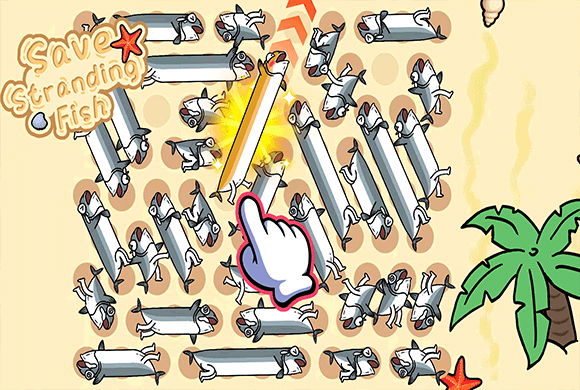
Save Stranding Fish turns a crowded beach into a direction puzzle. Drag a fish by its head to rotate it around its tail, then tap the head to send it toward the sea when the space ahead is open.
Every successful rescue creates room for another fish to turn or leave. The game includes wave progression, a hint button, an energy display, and a shop with five fish looks unlocked through ads.
The fish must face open water
A fish cannot leave while another fish blocks the space in front of its head, so rescue order is the heart of each wave.
01Study every fish direction
02Rotate around the tail
03Tap to release the fish
Beach rescue
Rotate each fish toward open water
Study every fish direction. Look for fish that already face open sand or can rotate without hitting their neighbors.
Rotate around the tail. Drag the fish head so the body pivots around its tail and points toward a usable lane.
Tap to release the fish. Tap the head when the path ahead is clear and the fish will swim off the beach toward the sea.
Repeat through the wave. Use each new gap to turn and rescue the remaining fish, calling on Hint when needed.
Good to know
Turn each fish toward open water
The game has a dedicated start screen with energy, Level, Skin, and Start controls.
Later waves, such as wave seven, pack more fish into tighter arrangements.
A Hint control is available when no clear rescue stands out.
The shop includes five fish appearances unlocked through ads.
See the beach
Inside Save Stranding Fish
Choose a rescue wave from the home screenUntangle a crowded Level 2 beachStudy a dense Level 2 arrangementFind open directions in later wavesBrowse the five fish skins
Save Stranding Fish guide
Make room, then send a fish to sea
The fastest rescue is rarely about tapping immediately. First make room for rotation, then point a fish into a lane that will remain clear long enough for it to reach the water.
Release fish that already face open space
An immediate rescue creates a gap without requiring another rotation and can make several blocked fish easier to turn.
Check the whole swing of the body
Because the tail is the pivot, make sure the fish has enough surrounding space for its head and body to rotate into the new direction.
Use Hint after testing the obvious lanes
When no route stands out, review the fish nearest open water first, then use the Hint control to identify a workable next rescue.
Questions
Save Stranding Fish FAQ
How do I rotate a fish?
Drag its head so the body pivots around the tail and faces a different direction.
Why will a fish not leave the beach?
Something is blocking the direction in front of its head. Rotate it or rescue the blocking fish first.
Does Save Stranding Fish have hints and skins?
Yes. A Hint control is available during play, and the shop offers five fish looks unlocked through ads.
Can I play Save Stranding Fish in a browser?
Yes. Save Stranding Fish plays in the portrait browser player on this page, including the hint control and skin shop.
Ready for another rescue wave?
Return to the beach, make room on the sand, and send the next fish toward open water.